


 Laptop
 Computers & Accessories
 Computer Components
 Monitors
 Networking Products
 Power Strips & Surge Protectors
 Printers


 Garments Accessories
Vestibulum curae torquent diam diam commodo parturient penatibus nunc dui adipiscing convallis bulum parturient suspendisse parturient a.Parturient in parturient scelerisque nibh lectus quam a natoque adipiscing a vestibulum hendrerit et pharetra fames nunc natoque dui.
-11%
Honeywell ScanPal 5100 Wifi Portable Barcode Scanner
Original price was: ৳ 51,100.00.৳ 47,000.00Current price is: ৳ 47,000.00.
Zebra DS2208 SR Corded 2D/1D Handheld Barcode Scanner
Original price was: ৳ 12,300.00.৳ 11,000.00Current price is: ৳ 11,000.00.
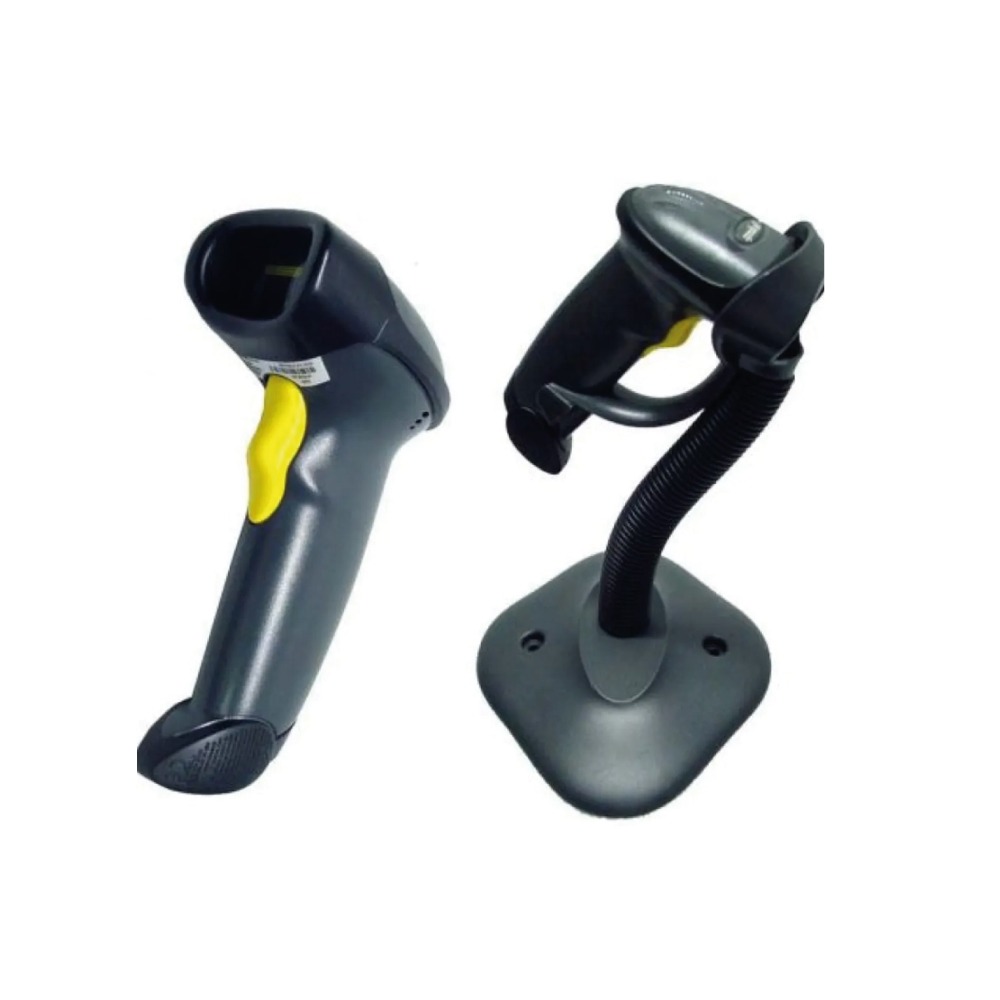
Zebra SYMBOL LS2208 GENERAL PURPOSE BARCODE SCANNER
Original price was: ৳ 9,500.00.৳ 8,500.00Current price is: ৳ 8,500.00.
Product Highlights / Key Features
Model: LS2208
1D Scanner
Speed: 100 scans per second
Weight: 5.3 oz./150.0 g
Connectivity:USB,RS232-485-46XX
Description
Description
Do you need a reliable and affordable barcode scanner?
Buy Zebra SYMBOL LS2208 GENERAL PURPOSE BARCODE SCANNER Affordable Price In Bangladesh
Zebra LS2208 General Purpose Barcode Scanner 1D is designed to provide fast, accurate scanning of barcodes, with a speed of up to 100 scans per second. The LS2208 comes in a sleek black color and weighs only 5.3 oz./150.0 g, making it easy to handle and store. This reader has a wide range of connectivity options, including USB and RS232-485-46XX, and can be used with either an auto or manual trigger. With a height of 6.0 in. and a width of 2.5 in, this barcode scanner is the perfect addition to any business.
Symbol LS2208 Zebra GENERAL PURPOSE BARCODE Reader Features & Benefits:
The Symbol LS2208 is a high-performance barcode scanner that offers a range of features and benefits. Some of these include:
Durability: The QR code scanner is designed to with stand multiple drops to concrete, making it ideal for use in busy retail and industrial environments.
Fast scanning: The LS2208 is capable of scanning barcodes at a fast rate, making it ideal for high-volume scanning applications.
Wide barcode compatibility: The reader can read a wide variety of barcode types, including 1D, PDF417, and UPC codes, making it suitable for use in a variety of industries.
Ergonomic design: The scanner is designed for comfortable use, with a lightweight and ergonomic form factor that minimizes hand fatigue.
Easy setup and configuration: The LS2208 is easy to set up and configure, making it simple for users to get started with the scanner.
POS compatibility: The scanner is compatible with most POS systems and software, making it easy to integrate into existing systems.
Easy troubleshooting and programming: The LS2208 includes a range of diagnostic tools and programming options, making it simple to troubleshoot and customize the scanner’s settings.
Affordable: The LS2208 is a cost-effective solution that offers a range of features and benefits at a competitive price point.
Overall, The Symbol LS2208 is a reliable, versatile, and durable barcode scanner that is ideal for a wide range of applications.
Symbol LS2208 Zebra GENERAL PURPOSE BARCODE SCANNER compatibility:
The Symbol LS2208 is compatible with a wide range of systems and devices, including:
POS Systems: The scanner is compatible with most POS systems and software, making it easy to integrate into existing systems.
Operating Systems: The LS2208 is compatible with Windows, Mac, and Linux operating systems, making it a versatile choice for use in a variety of environments.
Hardware: The scanner can be connected to a computer or other device via USB, making it easy to set up and use.
Software: The LS2208 is compatible with a wide range of software, including inventory management, point of sale, and data collection software.
Industry: The QR code reader is suitable for use in a variety of industries, including retail, healthcare, and light industrial.
Barcode Type: The LS2208 can read a wide variety of barcode types, including 1D, PDF417, and UPC codes, making it suitable for use in a variety of applications.
It’s always good to check with the manufacturer website or the vendor of the scanner for the most up to date and accurate compatibility information. Additionally, if you have any specific software or system that you need the scanner to work with, it’s recommended to check with the software or system vendor for compatibility.
Zebra Symbol LS2208 QR Code Scanner configuration:
The Zebra Symbol LS2208 can be configured using a variety of methods, depending on your specific needs and the software or system you are using. Some of the most common ways to configure the scanner include:
USB configuration: If the scanner is connected to a computer via USB, you can use the Symbol LS2208 Configuration Utility to configure the scanner’s settings. This utility allows you to change settings such as the scanner’s baud rate, data format, and other settings.
Programming barcodes: The scanner can also be configured by scanning special barcodes that are included in the scanner’s manual. This method is useful if you need to change the scanner’s settings quickly, but not recommended for all the settings.
Third-party software: Some third-party software, such as point-of-sale and inventory management software, may include options for configuring the scanner. This method is recommended if you are using the scanner with a specific system.
RS-232 configuration: The scanner can be configured using RS-232 serial communication, This is useful for users that have older system and that do not have USB ports available.
Serial command: The scanner can also be configured using a serial command interface. This method is useful for advanced users who need to customize the scanner’s settings in more detail.
It’s recommended to check the user manual of the scanner for the detailed instructions on how to configure the scanner. Additionally, the user manual and the manufacturer website are the best resources for troubleshooting and resolving any issues that may arise during the configuration process.
Shipping
Reviews (0)
Questions & Answers
Loading...
Shipping & Delivery


MAECENAS IACULIS
ADIPISCING CONVALLIS BULUM
- Vestibulum penatibus nunc dui adipiscing convallis bulum parturient suspendisse.
- Abitur parturient praesent lectus quam a natoque adipiscing a vestibulum hendre.
- Diam parturient dictumst parturient scelerisque nibh lectus.
Scelerisque adipiscing bibendum sem vestibulum et in a a a purus lectus faucibus lobortis tincidunt purus lectus nisl class eros.Condimentum a et ullamcorper dictumst mus et tristique elementum nam inceptos hac parturient scelerisque vestibulum amet elit ut volutpat.
More Products


Dual-band wireless 802.11 AC 750 Router with USB port | UR-814AC
Original price was: ৳ 3,340.00.৳ 2,999.00Current price is: ৳ 2,999.00.Product Highlights / Key Features
Dual-band wireless: 2.4 and 5 GHz
802.11ac wireless
IPv6, TR-069 support
1 multipurpose USB port
3G/4G modems support

REDRAGON P032 FLICK XL
Original price was: ৳ 1,750.00.৳ 1,650.00Current price is: ৳ 1,650.00.
Cooler Master MasterBox Elite 500 PC Case
Original price was: ৳ 5,400.00.৳ 4,800.00Current price is: ৳ 4,800.00.Product Highlights / Key Features
Model: MasterBox Elite 500
Without ODD Support
Versatile Cooling Options
Full Black Coating & PSU Cover
Breathable Power Supply Shroud

Acer Aspire Lite AL15-51 Laptop Intel Core i5 11th Gen FHD Display
Original price was: ৳ 68,400.00.৳ 61,500.00Current price is: ৳ 61,500.00.
Product Enquiry


Reviews
There are no reviews yet.